Guy Stuff
How To Use AI To Create Better Product Photos For E-Commerce


A product image needs to clearly show shoppers what they’re getting, since online they can’t physically inspect it. On an e-commerce site, it’s the first thing that a customer sees, and the overall look, including lighting, says a lot about the seller and the item.
Because of this, handling product photos differently from any other images can significantly impact sales. A sharp, well-lit picture can encourage a purchase, but a messy or inconsistent one makes people pause. And when customers hesitate, that’s usually when sales are lost. Businesses that make image quality a key part of their strategy, instead of just an extra step, often see better results.
Common Product Photo Problems
Cluttered Backgrounds
One of the biggest problems in product photos is a distracting background. Extra items in the picture pull focus away from the product. On a product page, this quality difference can quickly affect sales. Using a plain white or simple background is standard in e-commerce for a good reason: it keeps attention on the product, and most online stores require it for main listing photos.
Poor Lighting
Shooting in low light is one of the fastest ways to lose every detail a camera would otherwise capture cleanly. For product photography, lighting affects more than looks; it affects colour accuracy, and a colour mismatch between the photo and the item that arrives is one of the most common reasons for returns. A key and fill light setup, or even a north-facing window on an overcast day, goes a long way. Editing can only recover so much once the original shot is underlit.
Blurry Appearance
Blur can result from camera shake at the moment of the shot or from the lens failing to lock focus, and it’s especially common among beginners still learning their camera or phone. Product photos generally need to be sharp close-ups of the key feature, not an attempt to capture the whole item in a single frame—additional shots can cover the rest. A photo that customers can’t zoom into cleanly reads as a sloppy listing, regardless of what the product actually looks like.
Wrong Colors
A technically sharp, well-lit photo can still misrepresent a product if the colours are off—too warm, too cool, or shifted by the wrong white balance for the lighting used. Getting this right is as much a trust issue as a technical one: shoppers who receive something visibly different from the photo are more likely to return it and less likely to buy from that seller again.
Fixing Product Photos with Wink AI
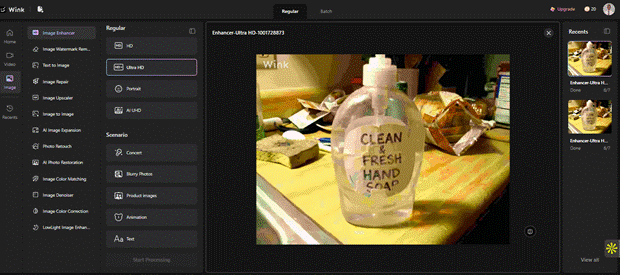
Wink AI gives you two tools to clean up product photos, each for a different problem. The image enhancer restores clarity, color, and detail in a shot that’s blurry, underlit, or generally soft. The image upscaler increases resolution—useful when a photo needs to stay sharp at a larger size, like a hero image or a zoomed-in detail view. For most everyday fixes, start with the enhancer; bring in the upscaler when the image also needs to get bigger without losing sharpness.
Both tools are built to be usable without an editing background, and both support batch upload— you can process a full catalogue of product shots in one session instead of one image at a time.
Open the Wink AI Image Enhancer
Go to the Wink AI Image Enhancer page and wait for it to load.

Upload Your Product Photos
Upload the product photo or photos you want to enhance from your device. Wink AI supports batch uploads so that you can enhance multiple images at once.

Download the Result
Export and download the processed images to your device, ready to upload to your store or marketplace listing.
Use Cases
Cleaner product images pay off in more than one context. Content creators use Wink AI to sharpen flyers, screenshots, and product images and videos before publishing — turning ordinary shots into visuals that hold up next to professional work. Video creators use it beyond stills too, bringing older or lower-quality clips up to a sharper, more watchable standard for their channel. E-commerce sellers also use the enhancer and upscaler together to bring an entire product range up to a consistent standard, without booking a studio session for every new listing.
Better product photos don’t require a full studio setup or years of editing experience. Getting the fundamentals right in the shot, then letting AI handle the cleanup, covers most of what a listing needs. Start with one product, run it through the enhancer, and compare it against the original before rolling the process out across a full catalogue.




Is It Time To Replace Your Tires Before Winter?

Bentley Torcal Revealed: The First Electric Bentley Is Here, And It Means Business

TAG Heuer’s Carrera Chronograph Sport Returns With A Sharper, Smaller Design

A Smarter Chicago, Illinois Food Weekend: Pair Neighborhoods, Appetite, and Budget

FuelFest Brings Car Culture Spectacle To New Jersey This Saturday!
FuelFest Brings Car Culture Spectacle To New Jersey This Saturday!
Is It Time To Replace Your Tires Before Winter?
A Smarter Chicago, Illinois Food Weekend: Pair Neighborhoods, Appetite, and Budget
TAG Heuer’s Carrera Chronograph Sport Returns With A Sharper, Smaller Design
Bentley Torcal Revealed: The First Electric Bentley Is Here, And It Means Business

Watch The Fast And Furious Trailer For ‘Hobbs & Shaw’

A Dance-Off For The Ages Broke Out At Monday Night’s 76ers Game

Netflix Drops ‘Black Mirror: Bandersnatch’ Trailer Ahead Of Release Tomorrow

Former NASA Engineer Gets Revenge On Package Thief With Glitter Bomb

Recent Comments